
Digital stamp card
A digital stamp card that lives in your customer's wallet
A digital stamp card is the paper buy-nine-get-one card, moved into the wallet app already on your customer's phone. It works the same way — a stamp per visit, a reward when the card is full — but it cannot be lost, washed or left at home, and it is always in the same place as their bank card and boarding passes.
YourLoop, built by SaifX, makes digital stamp cards for businesses in the UAE. The card is saved to Apple Wallet or Google Wallet, there is no app for the customer to install, and your staff add the stamps by scanning the card at the counter.
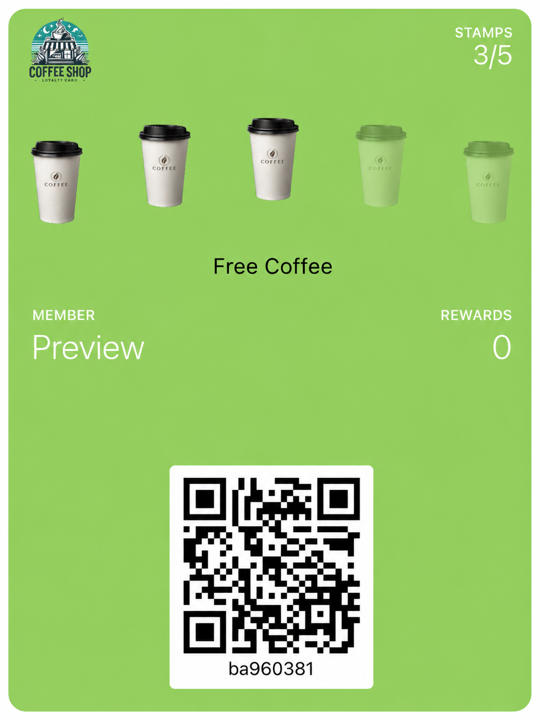
How a digital stamp card works
- 1
Your QR code sits at the counter. A customer scans it, enters their name and phone number, and taps to add the card to Apple Wallet or Google Wallet. Nothing to download, no account to create.
- 2
After each qualifying purchase, the customer shows the card and a member of your staff scans it to add the stamp. Staff do this deliberately, every time — a stamp is never added just because someone walked in.
- 3
At the number of stamps you set, the reward is ready to claim. Your staff mark it claimed at the counter and the card resets to zero for the next run.
How do I move my paper stamp card to digital?
Copy the paper card's rule and reward, put your logo on it, and place the QR code where the paper cards used to be handed out. Keep the rule you already have. If your paper card says buy five, get the sixth free, set the target to five stamps and the reward to one free service. Your customers already understand it; there is nothing new to explain.
Design the card so it looks like your shop: your colours, your logo, and your own stamp icon — a cup, a pair of scissors, a car. The card in the customer's wallet carries your name, not ours.
Print the QR code and put it exactly where you used to hand out the paper card — on the counter, by the till, on the mirror, on the receipt. That is the whole rollout.
YourLoop does not read or import paper cards, so there is no way to carry old stamps across automatically. Most businesses honour the paper cards already in circulation until they are used up, and give every new customer the QR code instead.
You can run more than one card at once on every plan. A coffee card and a pastry card, or a cut card and a colour card, are separate cards the same customer can hold together — and you can choose which card's customers a message goes to.
What does the customer see on their phone?
Your customer sees a card in Apple Wallet or Google Wallet with your logo, your colours and their current stamp count. The count updates after your staff scan it, and when the reward is ready, the card says so.
You can send a message to everyone holding your card, and it appears on the pass itself. Messages can be sent and scheduled; whether a given phone displays one depends on the customer's own device and wallet settings, so treat it as a nudge rather than a guarantee.
If a customer changes phones, they open your join link again with the same phone number and the card is offered back to them with their stamps intact.
What it costs
AED 149 a month for one location, with unlimited cards, unlimited customers and unlimited staff accounts. There is a 7-day free trial; a payment card is required to start it, and nothing is charged until the trial ends. Up to five locations, reward levels and win-back messaging sit on Pro at AED 249. Annual billing is roughly two months free.
Reward levels run in sequence: a customer completes one level, claims it, and starts the next from zero. Nothing accumulates across levels.
Everything works in English and Arabic, with full right-to-left layout.
Common questions
- What is a digital stamp card?
- A loyalty stamp card saved to Apple Wallet or Google Wallet instead of printed on paper. The customer collects one stamp per qualifying visit and claims a reward when the card is full, exactly as with a paper card — but the card lives on their phone and cannot be lost.
- Do my customers need to download an app?
- No. They scan your QR code, enter a name and phone number, and add the card to the wallet already on their phone. Only your staff use the scanner, which runs in a web browser.
- Can I move my existing paper stamp card to digital?
- Yes. Set the same number of stamps and the same reward, add your logo and colours, and put the QR code where the paper card used to be. YourLoop cannot read the stamps already on a paper card, so most businesses honour those until they are used up.
- Is a stamp added automatically when a customer visits?
- No. A member of your staff scans the customer's card at the counter to add each stamp. It is a deliberate action every time — nothing is recorded just because someone came in.